One library. The right version, on every device, every time.
vablet’s content library gives marketing one central point of administration for everything the field presents. Set the audience, the approval window, and the device rules once; reps only ever see what is current, online or offline.
Control and organize. Push and share. Track and measure.
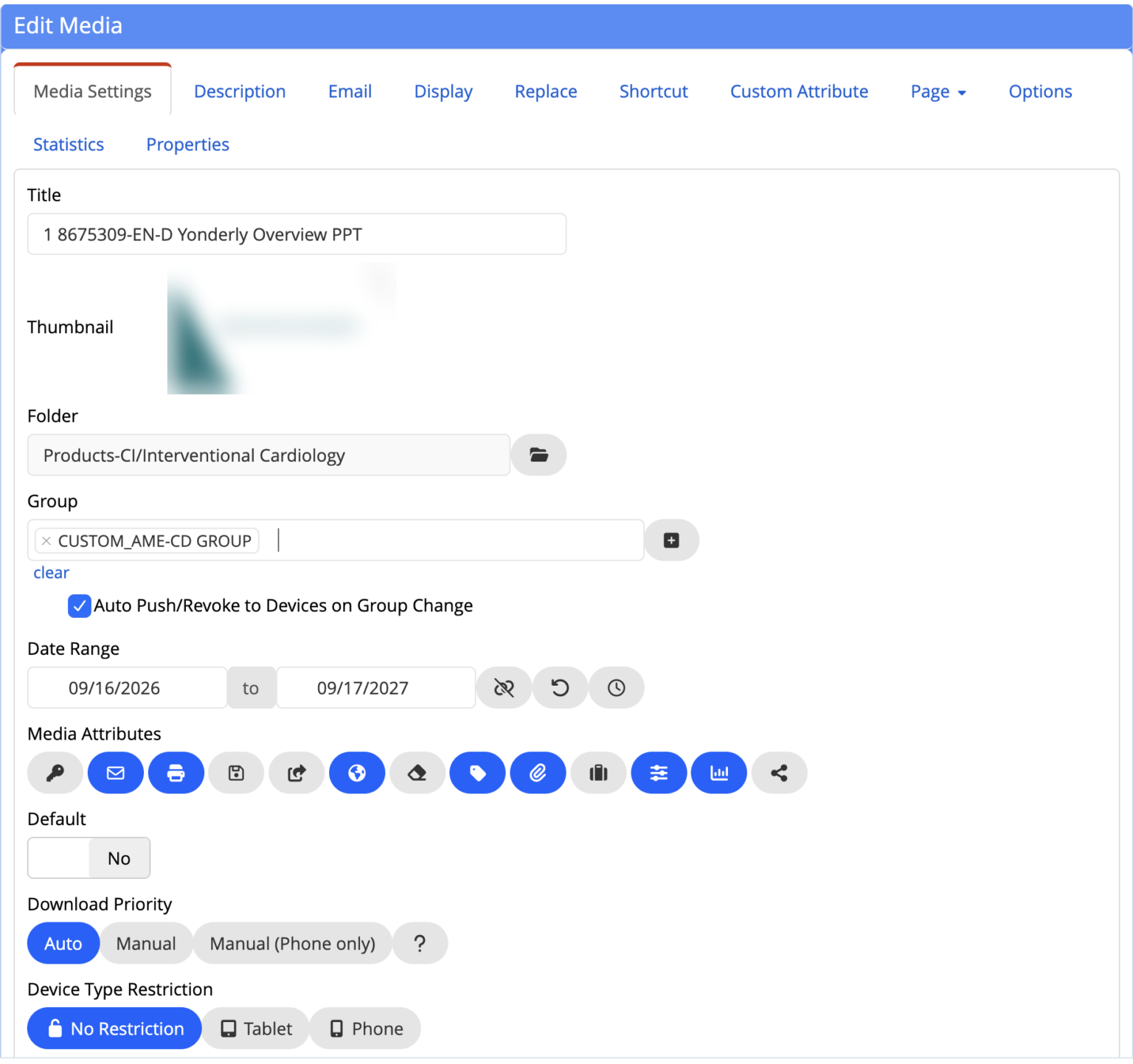
Control and organize
Manage all mobile sales and marketing content from one central point in the cloud. Organize it into meaningful groups and deliver the right content to the right devices instantly.
- Folders and groups by team, region, role, or language
- Access permissions by user or group
- Approval windows and expiry dates on every file
Push and share
Update a version with a single click and it replaces the old one on every device. Push new content with a notification. Reps share tracked links and email from the field.
- One-click version replacement, everywhere
- Auto push and revoke when a group changes
- Tracked email and share links
Track and measure
See which content is accessed and used, including activity captured offline, so you know what works and can keep the library focused and current.
- Page-level engagement analytics
- Audit trail: who, which version, when
- Power BI and CRM reporting
From approved file to the rep’s hand in four steps.
Upload once
Add the approved file to the library. Any type: deck, PDF, video, form, HTML app.
Set the rules
Choose the groups, the approval window, the device rules, and whether it is internal only.
Push
It syncs to every device in the group, with a notification. Offline from that moment on.
Retire automatically
On the expiry date, or the moment you revoke it, the file disappears from every device, even ones that are offline.
Everything a content library should do.
One central library
Every deck, document, video, form, and HTML app in one place in the cloud.
Groups and permissions
Set who sees what by user, group, team, region, role, or language.
One-click version replacement
Update a file once; the new version replaces the old on every device.
Approval windows and expiry
Content appears on its start date and disappears on its end date, even offline.
Any file type
Presentations, PDFs, video, images, fillable forms, and HTML apps.
Offline delivery
Synced to the device, usable with no connection, synced back when reconnected.
Push with notifications
Deploy content and updates with a click; reps are told when something new arrives.
Usage you can see
Which content was accessed, presented, and shared, including offline activity.
“Having vablet available on a rep’s phone, tablet, computer and browser means they can respond quickly, and always with the correct aid.”
Rebecca, Enablement ManagerContent library management, answered.
What is enterprise content management in vablet?
vablet’s content library lets marketing manage every piece of mobile sales and marketing content from one central point in the cloud, then deliver it to any device, online or offline. Reps get rich content, video, fillable PDF forms, and HTML apps on the phone, tablet, computer, or browser they already carry.
Can I manage all content from one place?
Yes. One central point of administration in the cloud. You organize files into groups and push them to the right devices in the field instantly.
How does vablet handle version control?
You update a file version with a single click and the new version replaces the old one on every device automatically. Outdated files no longer exist on reps’ devices, which is how vablet keeps content accurate and compliant.
Can I control who sees which content?
Yes. Access permissions are set by user or group, so each person or team sees only the content relevant to them. Approval windows and expiry dates control when content is available.
What types of files can vablet manage?
Presentations, documents, videos, images, fillable PDF forms, and HTML apps, all usable anywhere, anytime, on any device.
Does vablet content work offline?
Yes. Content syncs to the device and works with no connection at all, so reps can present and capture data in the field without Wi-Fi. Changes and captured data sync when the device reconnects, and expiry rules are enforced offline too.
How does vablet keep content accurate and compliant?
Central administration, permission controls, approval windows, and one-click version updates ensure everyone always has the current approved version. Outdated content is removed automatically, and every access is recorded in the audit trail.
Can I organize content for different teams or regions?
Yes. Files are organized into meaningful groups and delivered to the right devices instantly, tailored by team, region, role, or language.
What visibility do I get into content usage?
vablet records which content is accessed, presented, and shared, including activity captured offline in the field, down to the page. You see what is working and keep the library focused and current.
How quickly can vablet be deployed?
Most teams are live in weeks and managed by a single admin. There is no implementation fee and no heavy IT project.
Bring one approved deck. We will show you the whole lifecycle.
Loaded, locked to its approval window, pushed to a device, presented offline, and retired on schedule, in a 20-minute walkthrough.
Live in weeks. No implementation fee. $25 per user per month, MSRP.